by can_admin | Jun 16, 2014 | Uncategorized
If you’re a Comcast customer, and you rent your cable modem & router through them, your home will soon become a public wifi hotspot….if it hasn’t already. Hundreds of customers have started complaining about this, as it opens your personal network up to the potential of hackers getting easier access to your computer, and could ultimately jeopardize your connection and download speeds.
How can you fix it? Purchasing your own cable modem and router (usually under $125 for the set) actually ends up saving you the rental fee you already pay each month, it decreases your potential for future router/modem problems because they’re separate higher quality equipment, and it ends up disabling Comcast from using your home device as a public wifi spot.
For more information, see this article (http://www.clickondetroit.com/money/Comcast-is-turning-your-home-router-into-a-public-Wi-Fi-hotspot/26507244), and contact Canyonero for how we can set you up with a reliable replacement.
by can_admin | Jun 6, 2014 | Uncategorized
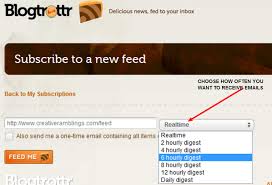
Getting news now a days can be quite a challenge, and many people are relying on the internet to keep up with everything from top world news to latest blog posts from their favorite recipe website. However, remembering to visit each of your favorite websites is often hard to do….which is where Blogtrottr comes in. Blogtrottr.com is a free online service that takes an RSS feed you’re interested in, and sends you an email when it’s updated with the content. For example, if you want to get the latest news from cnn.com emailed to your inbox, do a google search for “CNN RSS”, find the specific topic you’re interested in (political news, world news, sports, etc.). Copy that link and go to blogtrottr.com to sign up for an account, and give them that link and set how frequently you want to be notified with an email including a table of contents of stories, including pictures and links to the original post. It’s great to wake up each morning and know I have my news already waiting for me in my inbox. It’s also great for websites that only update every few days; when there’s an update, you’ll get an email, otherwise you won’t.
Another alternative to Blogtrottr.com is feedmyinbox.com (which is a paid service), but I’ve personally found I like the format and layout of blogtrottr, and it’s worked great for the last year or so I’ve used it (and I’ve actually found their advertisements to be minimal and relevant to my interests). Give it a try, and let us know your feedback! Of course, we would love for you to subscribe to our feed….http://canyonero.org/feed/

by can_admin | May 28, 2014 | Uncategorized
Last week, eBay had announced it too had a “now-all-too-common” security breach, and was suggesting people change their passwords to protect their identity from further abuse. In the wake since this announcement, scammers have been sending “phishing emails” that look like they’re from eBay prompting people to change their password using a link in the email. The emails look very legit- and may even have your username and or actual name listed, but sadly they link to non-eBay websites and attempt to get you to “change your password” there. The scammers are hoping that you enter a username and password combination that you use elsewhere online, and depending on how naive you seem, will ask you to “verify” your SSN, credit card info, and/or bank information. This kind of email spamming from “eBay” isn’t new; it became so popular several years back that eBay stopped sending emails with links in them because it became so hard to determine legit communication from eBay. That direction still holds true, and eBay will prompt you to log into your account, and visit their account management page to make any changes, rather than give you a link directly to it in an email. It’s actually a good practice to never click on links in email, and log into your account separately when you receive communication from them. Now more than ever, please be leery of official looking emails from trusted websites you deal with, and be very cautious of links, pictures, and files you download from them- not only to protect your computer from viruses, but to protect your identity as well!
http://www.wxyz.com/money/consumer/dont-waste-your-money/following-ebay-security-breach-scammers-send-fake-email-prompting-users-to-change-password

by can_admin | May 19, 2014 | Uncategorized
In the last year, online gaming has skyrocketed for pre-teens, thanks to popular socially-driven games like Minecraft. Unfortunately, it has also caused an influx in repeat customers for spyware & virus removal, thanks to “scammy” popups promising free game help, tokens, and other enhanced features to games. While having a good, updated antivirus program is a start, it won’t stop ads and popups from continually tweaking their settings to avoid the virus scanners, thus continuing the cycle. Microsoft offers some suggestions to make the experience for school-aged kids a little less problematic for your pocketbook, if nothing else:
1. Stick to well-known games from trusted sites. Sticking to games that are from MSN, Yahoo, AOL, Nickelodeon, etc, are typically safer.
2. Use a safe browser. Google Chrome or Mozilla Firefox are typically considered safer than Internet Explorer because of the built in popup protection they offer.
3. Go directly to the game address, don’t google search for it. Google Searching is often misleading, and searching for “play Minecraft online” leads virus and spyware-laden links as the first couple of results. If need be, help kids determine how to link to and or bookmark their favorite games.
4. Create anonymous usernames. Ensure things like the child’s name, school name, age, or other unique identifiers aren’t used as the username.
5. Help kids understand what popups are- and when not to click on them. The banners on the top and side of the screen usually scream to kids to “click here” to play a different game or link to a different site. Help them notice when links take them to another domain and encourage they NEVER click on those ads.
In addition, doing a periodic check of the history on your browser, and ensuring that no new programs have “magically appeared” on your desktop are a good reminders, as is making sure that your antivirus is downloading updates and protecting against attacks using real-time scanning. Using popular trusted programs like Malwarebytes in addition to your virus scanner are also good practices. If all else fails, make sure that as soon as you start seeing suspicious activity on the machine that it is cleaned by a trusted professional as soon as possible to prevent more malicious programs from gaining access to your machine.
For more safe-online practices, see Microsoft’s suggestions here: http://www.microsoft.com/security/family-safety/gaming-about.aspx
by can_admin | May 15, 2014 | Uncategorized
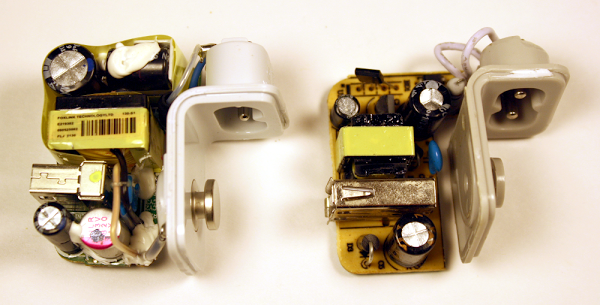
Apple is notorious for being expensive, and if you have shelled out the money to buy one of their devices or computers, the last thing you want to do is pay a premium price for a second charger or cable. You probably heard the news story last year of the woman electrocuted while charging her iPhone, but was it an isolated problem? The fallout from investigations into her death revealed she was using an aftermarket charger; a charger that wasn’t made by Apple, but was made to work with Apple products. These products are frequently sold online and at mall kiosks, but are not always safe to use. Numerous reports have shown that non-OEM products not only function differently, but are sometimes made of entirely different products. Now, we have some detailed pictures from inside that prove how different they are, thanks to this link: http://www.righto.com/2014/05/a-look-inside-ipad-chargers-pricey.html
Personally, I’ve had an aftermarket MacBook charger overheat and melt the plastic on the case (a safety and fire hazard), and I’ve had a non-OEM iPhone data cable cause sporadic resets, confirmed by an Apple engineer to be caused by aftermarket charging cable. I’m always one to save a buck, but after those issues, all of my non-Apple cables and chargers were pitched.
Moral of the story….it’s worth a couple of extra bucks to buy Apple’s original adapter, or cables.
NOTE: This only applies to Apple products. Why? Because their design is unique, and optimized for style, and therefore hard to copy exactly. Manufacturers cut corners, and because they didn’t design the product themselves, they don’t know the specifics on engineering (and can’t afford the thorough research to make a lower cost charger worthwhile to produce). For most other laptop manufacturers, as long as the power outputs match, and it’s purchased from a reputable source, it should be safe to use. The same is true for standard cables like micro-usb.